Why Is Texty SMS Not Sending
Start in Texty > Tools and send an SMS to your own phone. Then open Texty > SMS Logs and check the new result. A failed test points to the gateway, sender, account, or phone. If the test works but an event SMS is missing, check the alert, automation, phone source, or timing rules.
What do you need before you start?
Section titled “What do you need before you start?”You need WordPress admin access and a phone you control. Keep your gateway dashboard open if you can.
Never share an API token, secret, license key, or full buyer SMS in a public post.
What is the fastest way to find the cause?
Section titled “What is the fastest way to find the cause?”Run this short test first. Do not change many settings at once.
- Open Texty > Dashboard.
- Send a test SMS to your own phone in full international format.
- Open Texty > SMS Logs.
- Find the newest test record.
- Open View Log and read the gateway response.
- Match the result to the table below.
| Test result | Where to look next |
|---|---|
| No log appears | Active gateway and global pause setting |
| The log says Failed | Credentials, sender, provider account, or phone format |
| The log stays Pending | Gateway report and provider status |
| The log says Sent, but no SMS arrives | Provider report, carrier, sender, or destination rules |
| The test arrives, but an alert does not | Alert toggle, event, recipient, or role |
| The test arrives, but an automation does not | Trigger, delay, threshold, limit, or cooldown |
Why does no SMS Log appear?
Section titled “Why does no SMS Log appear?”No log often means Texty did not reach the send step. Check these items in order:
- Go to Texty > Notifications > Settings.
- Make sure Pause All Notifications is off.
- Go to Texty > Settings and confirm that one gateway is active.
- Open the alert or automation and make sure its toggle is on.
- Check that the matching event happened after you saved the setting.
- Confirm that Texty can find the correct phone number.
- Review any automation delay, threshold, reminder limit, or cooldown.
Events that happen during a site-wide pause are not sent later. Turn off the pause. Save the change, then make a new test event.
Why does the SMS fail right away?
Section titled “Why does the SMS fail right away?”A quick failure often means the gateway rejected the request. Open View Log and read its response first.
Check the credentials saved for your provider:
| Gateway | Credentials to check |
|---|---|
| Twilio | Account SID, Auth Token, and From Number |
| Vonage | API Key, API Secret, and sender |
| Plivo | Auth ID, Auth Token, and From Number |
| Clickatell | API Key |
Copy each value again from the provider dashboard. Remove spaces at the start or end. Then use Connect and Activate in Texty > Settings.
If the gateway connects but the send still fails, check:
- The phone includes a plus sign and country code.
- The provider account has enough funds.
- The sender can send SMS to that country.
- A trial account can send to the test number.
- The provider has approved the number or Sender ID.
- The destination is not blocked in your provider account.
Send a new test after you change one item. This helps you find the real cause.
What should you do with a Pending SMS?
Section titled “What should you do with a Pending SMS?”Pending means the log has no final Sent or Failed result. Open it. Note the time, gateway, reference ID, and response.
Find the same SMS in your gateway report. If an old log stays pending, send one new test. Is that test pending too? Check the provider status and account before you change Texty.
Texty does not treat Pending as proof of delivery.
Why does the log say Sent when the phone received nothing?
Section titled “Why does the log say Sent when the phone received nothing?”Sent means the gateway took the request with no error. It does not prove that the SMS reached the phone.
Check the gateway report for the final status. Common causes include:
- A carrier delay or filter
- A blocked sender or route
- Country limits or sender approval rules
- A phone that blocks the sender
- A wrong but valid phone number
Try a second phone on another network. If that SMS arrives, the first route or phone may be at fault.
Why did an admin or staff member receive no alert?
Section titled “Why did an admin or staff member receive no alert?”WordPress and WooCommerce admin alerts can target selected roles. Texty then uses Phone Number (Texty) on each matched user.
- Go to Users > All Users.
- Open the missing recipient.
- Check the user’s role.
- Check Phone Number (Texty).
- Save the full number with its country code.
- Confirm that the role is selected in the Texty event.
Texty skips a user when no Texty phone is saved. See how to control SMS notification recipients for each phone source.
Why did a customer or Dokan vendor receive no alert?
Section titled “Why did a customer or Dokan vendor receive no alert?”Buyer alerts use the billing phone on that order. They do not use the Texty field on the buyer’s WordPress account.
Dokan alerts use the phone in the vendor’s store profile. Check that Dokan is active. The order must also belong to that vendor.
If no log appears, check that the right order event is on. Make a new test order. Then move it to that status.
Why did a Texty automation not run?
Section titled “Why did a Texty automation not run?”First, make sure the Pro license is active. Then open Texty > Notifications > Automations and check the trigger.
Review these rules:
- The trigger is on.
- The test event matches that trigger.
- The saved delay has passed.
- The threshold was met.
- The reminder limit was not reached.
- The customer is outside any cooldown.
- The recipient phone is valid.
Some flows run at once. Others wait for minutes, hours, or days. Use how to customize automation timing and cooldowns to check the saved rule.
Why did an OTP code not arrive?
Section titled “Why did an OTP code not arrive?”Test the gateway before you change OTP rules. Does the test arrive? Check the OTP flow next:
- Make sure the Texty Pro license is active.
- Open Texty > OTP.
- Turn on the needed checkout, registration, or profile trigger.
- Check the phone format.
- Wait for the resend cooldown.
- Use the newest code sent to the phone.
- Request a new code if the old one expired.
Five wrong tries make the code fail. Texty also caps sends and checks from one IP address. Wait for the cap to clear before you test again.
See how to customize OTP settings for the code, expiry, resend, and safety rules.
How do you read the exact gateway error?
Section titled “How do you read the exact gateway error?”- Go to Texty > SMS Logs.
- Select Failed.
- Find the affected message.
- Select View Log.
- Read Gateway Response.
- Copy the reference ID if one is present.
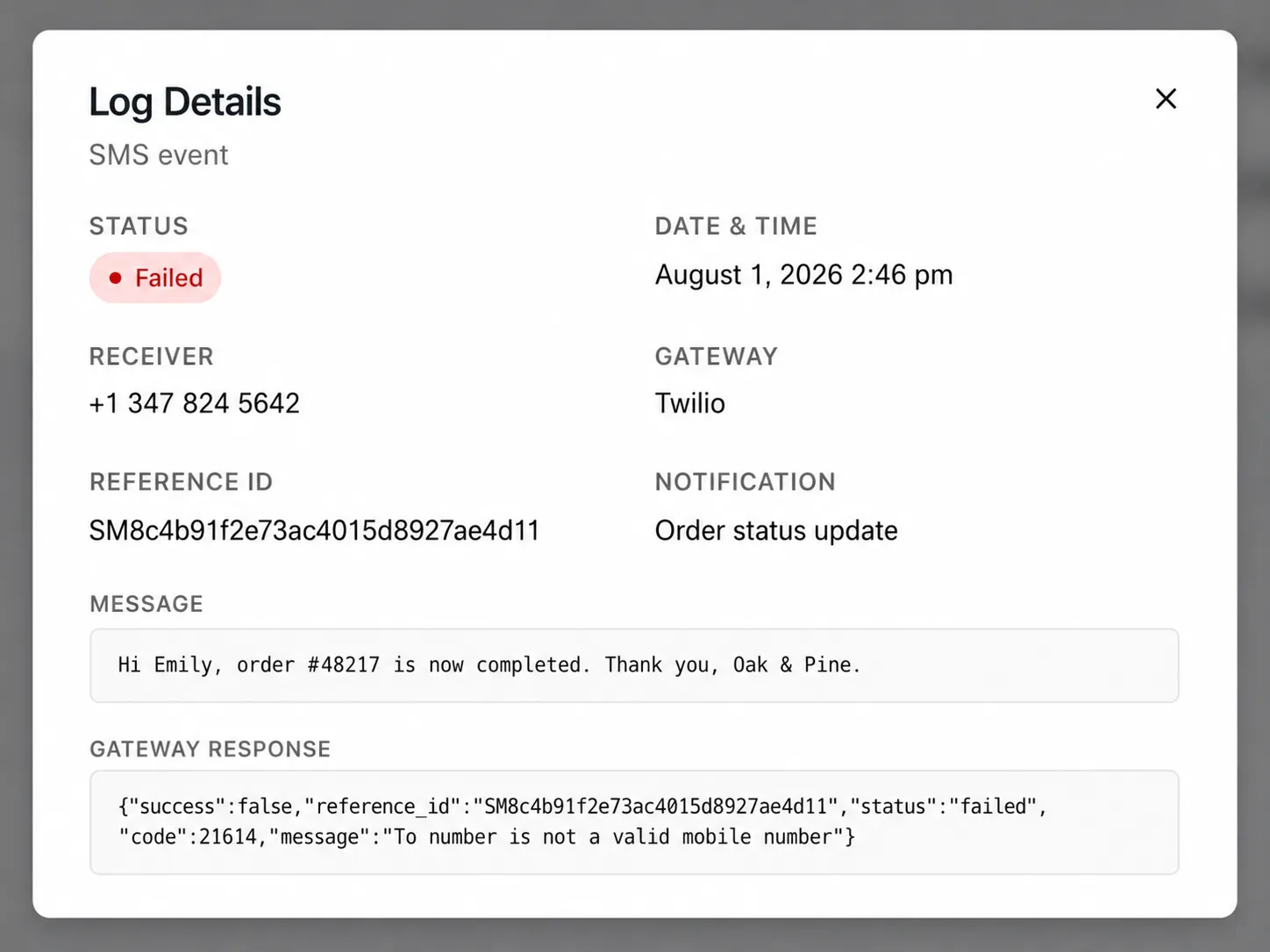
The response may use terms from your gateway. Search its help site for the error code. You can also send the code to support.
What should you send Texty support?
Section titled “What should you send Texty support?”Share enough detail to test the issue. Keep all private data hidden.
- Texty and Texty Pro versions
- WordPress, WooCommerce, and PHP versions
- Gateway name
- Log date and time
- Log status and reference ID
- Gateway response
- Alert, automation, or OTP flow used
- Steps that created the issue
Hide most of the phone number and any private SMS text. Never share a gateway token, API secret, or license key.
Should you disconnect the gateway before checking the log?
Section titled “Should you disconnect the gateway before checking the log?”No. Read the new log first. If you unlink too soon, the next test may be harder.
Will Texty resend messages missed during a global pause?
Section titled “Will Texty resend messages missed during a global pause?”No. Turn off the pause and create a new event. Missed events are not queued for later.
Does a Sent status confirm delivery?
Section titled “Does a Sent status confirm delivery?”No. It confirms that the gateway accepted the request. Use the gateway report to check the carrier result.
Can a correct gateway setup still fail?
Section titled “Can a correct gateway setup still fail?”Yes. Low funds, trial limits, sender rules, country blocks, and phone filters can stop a valid send.
What should you do next?
Section titled “What should you do next?”Please follow the remaining guides to make the most out of Texty.