How To Customize OTP Settings
You can customize OTP codes from Texty > OTP in your WordPress dashboard. Choose the code length and type, set its expiry and resend wait, then edit the SMS. These settings apply to checkout, registration, and phone number changes.
What do you need before you start?
Section titled “What do you need before you start?”Make sure Texty and Texty Pro are active. Your Pro license must show an active status.
You also need a working SMS gateway. OTP cannot reach a phone if no gateway is active. If needed, follow how to connect your first SMS gateway.
How do you set the OTP code length and type?
Section titled “How do you set the OTP code length and type?”Sign in to your WordPress dashboard. Go to Texty > OTP.
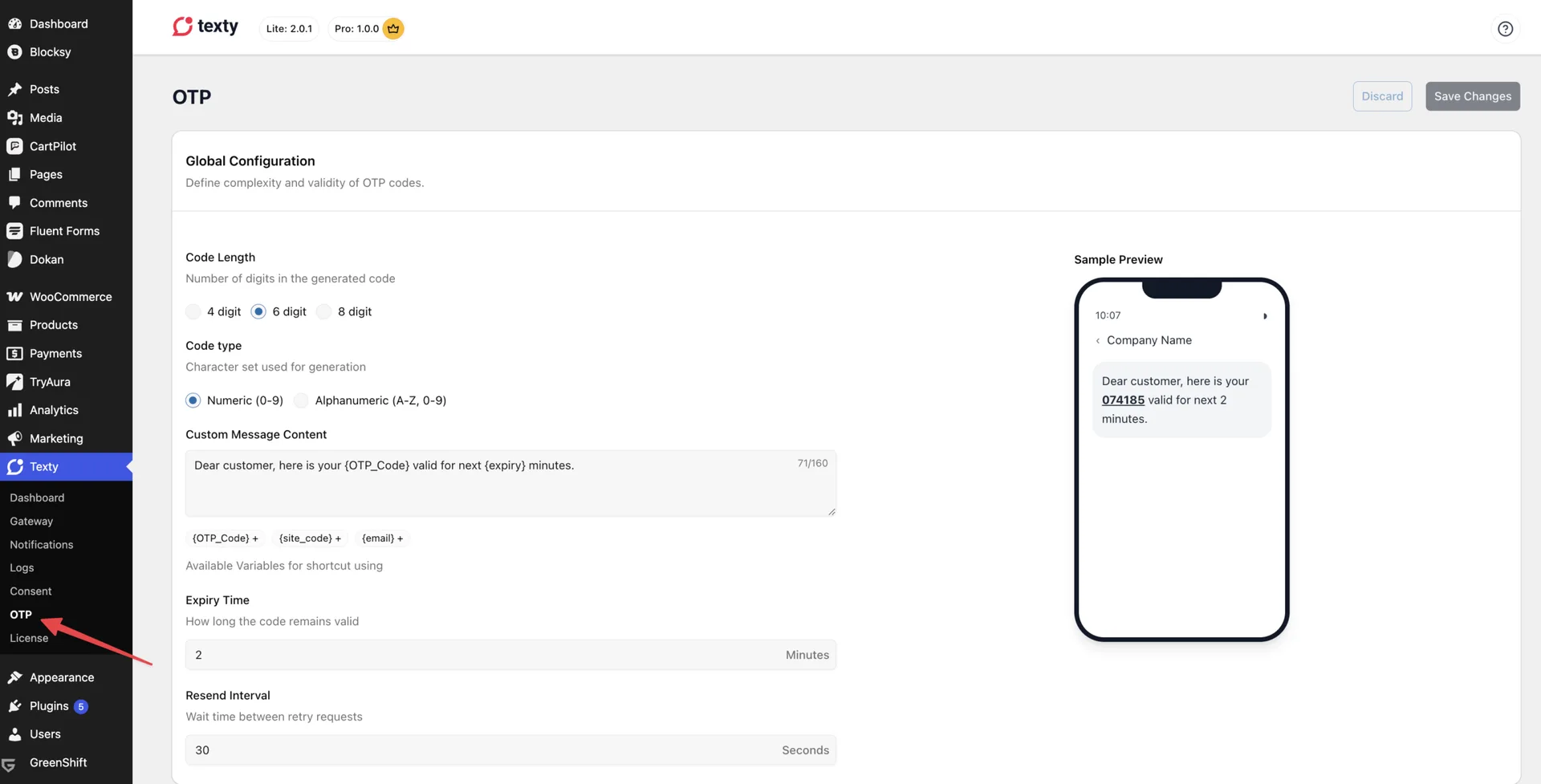
Find the global OTP settings. Choose a code length.
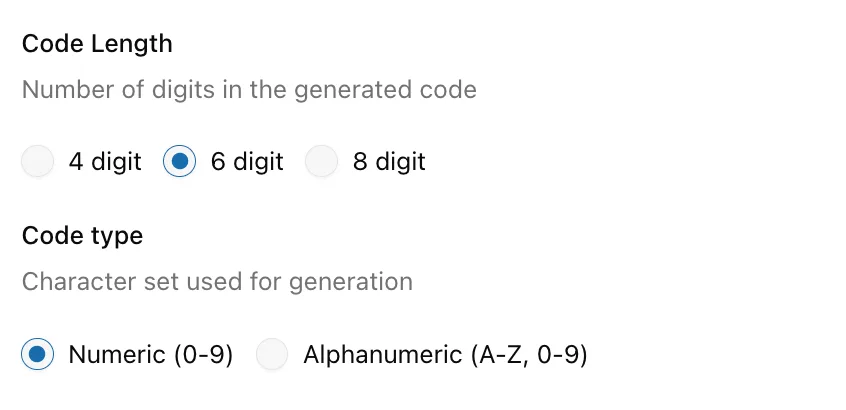
Choose a code type. Write the Custom Message if needed, set the expiry time, and resend inteval and save your changes.
| Setting | Options | Default |
|---|---|---|
| Code length | 4, 6, or 8 characters | 6 |
| Code type | Numeric or alphanumeric | Numeric |
A numeric code uses digits only. An alphanumeric code uses letters and digits. Texty leaves out I, O, 0, and 1 so the code is easier to read.
How do you change the OTP message?
Section titled “How do you change the OTP message?”Find the OTP message field on the same page. The default message is:
Dear customer, your \{OTP_Code} is valid for the next \{expiry} minutes.
You can rewrite it to fit your store. Keep the message clear and place the code near the start. The editor allows up to 160 characters.

Use only the tags shown in your Texty settings.
| Tag | What it adds |
|---|---|
\{OTP_Code} | The one-time code |
\{expiry} | The code expiry in minutes |
\{site} | Your site name |
\{site_code} | The short code for your site |
Here is a simple example:
Your \{site} code is \{OTP_Code}. It expires in \{expiry} minutes.
Do not ask customers to share the code. Review the live sample before you save.
How do you set expiry and resend timing?
Section titled “How do you set expiry and resend timing?”Use the expiry and resend fields to control how long each code can be used.
| Setting | What it controls | Range | Default |
|---|---|---|---|
| Expiry | How long the code stays valid | 1 to 60 minutes | 2 minutes |
| Resend cooldown | How soon another code can be sent to the same phone | 10 to 600 seconds | 30 seconds |
A short expiry gives less time to use a stolen code. It can also be hard for people who need more time to read the SMS.
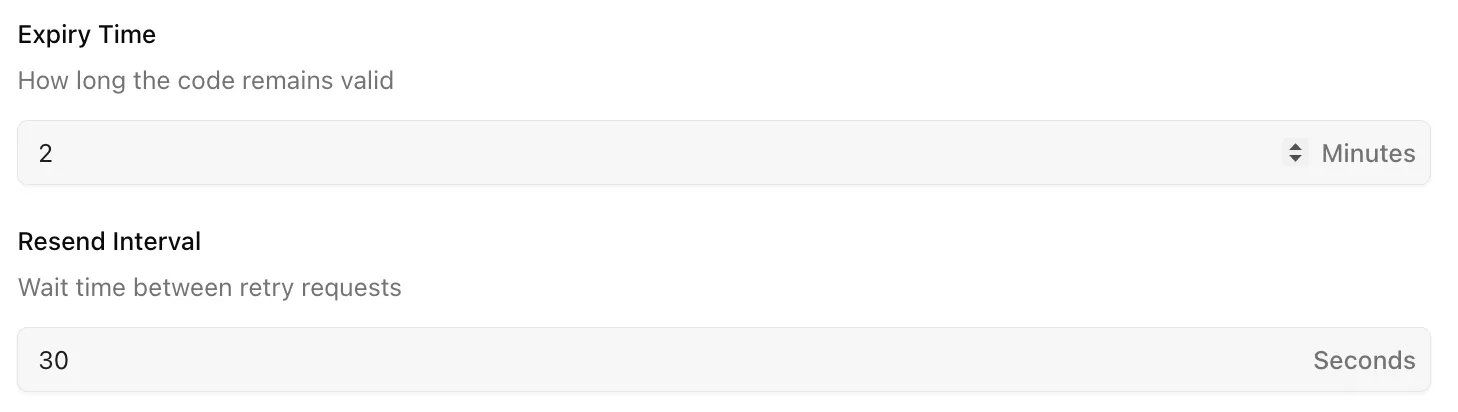
A longer resend wait can reduce repeat sends and gateway costs. Do not make it so long that a delayed message blocks a real customer.
Good starting point: Keep the two-minute expiry and 30-second resend wait. Change them only if your tests show a clear need.
What safety limits does Texty apply?
Section titled “What safety limits does Texty apply?”Texty applies these limits to every OTP flow:
- Five wrong attempts make the current code invalid.
- One IP address can request up to 10 OTP messages per hour.
- One IP address can make up to 30 verification attempts per hour.
- A verified state lasts for 30 minutes.
These limits are built in. You cannot change them from the OTP settings.
How do you test your OTP settings?
Section titled “How do you test your OTP settings?”Enable one OTP flow, then test with a phone you control.
- Request a code.
- Check that the SMS uses your new wording.
- Confirm that the code has the right length and type.
- Enter the correct code.
- Request another code and check the resend wait.
- Let a code expire, then make sure Texty rejects it.
Do not run repeated tests from a customer phone. Each SMS may add to your gateway bill.
Success check: The SMS uses your saved format, the correct code works, and expired or old codes do not.
Why is the OTP message not working?
Section titled “Why is the OTP message not working?”| What happened | What to check |
|---|---|
| No code arrives | Confirm that a gateway is active and the phone uses an international format. |
| A tag appears as plain text | Copy the tag exactly as shown in Texty. |
| The message is cut off | Shorten it and keep it within 160 characters. |
| Resend is blocked | Wait for the resend cooldown to end. |
| A new code fails | Use the latest code sent to the phone. |
| The code expired too soon | Raise the expiry time, save, and test again. |
Which OTP code length should you use?
Section titled “Which OTP code length should you use?”The six-character default is a good starting point for most stores. A longer code is harder to guess, but it takes more time to enter.
Can each OTP flow use different settings?
Section titled “Can each OTP flow use different settings?”No. The code, message, expiry, and resend settings are shared by checkout, registration, and profile changes.
Are OTP codes stored as plain text?
Section titled “Are OTP codes stored as plain text?”No. Texty stores a protected hash of the code, not the raw code.
Can you add your own OTP message tags?
Section titled “Can you add your own OTP message tags?”Developers can extend OTP variables with a Texty Pro filter. Store admins should use only the tags listed in the current settings.
What should you do next?
Section titled “What should you do next?”Choose where customers must verify their phone: