How to Track SMS Performance
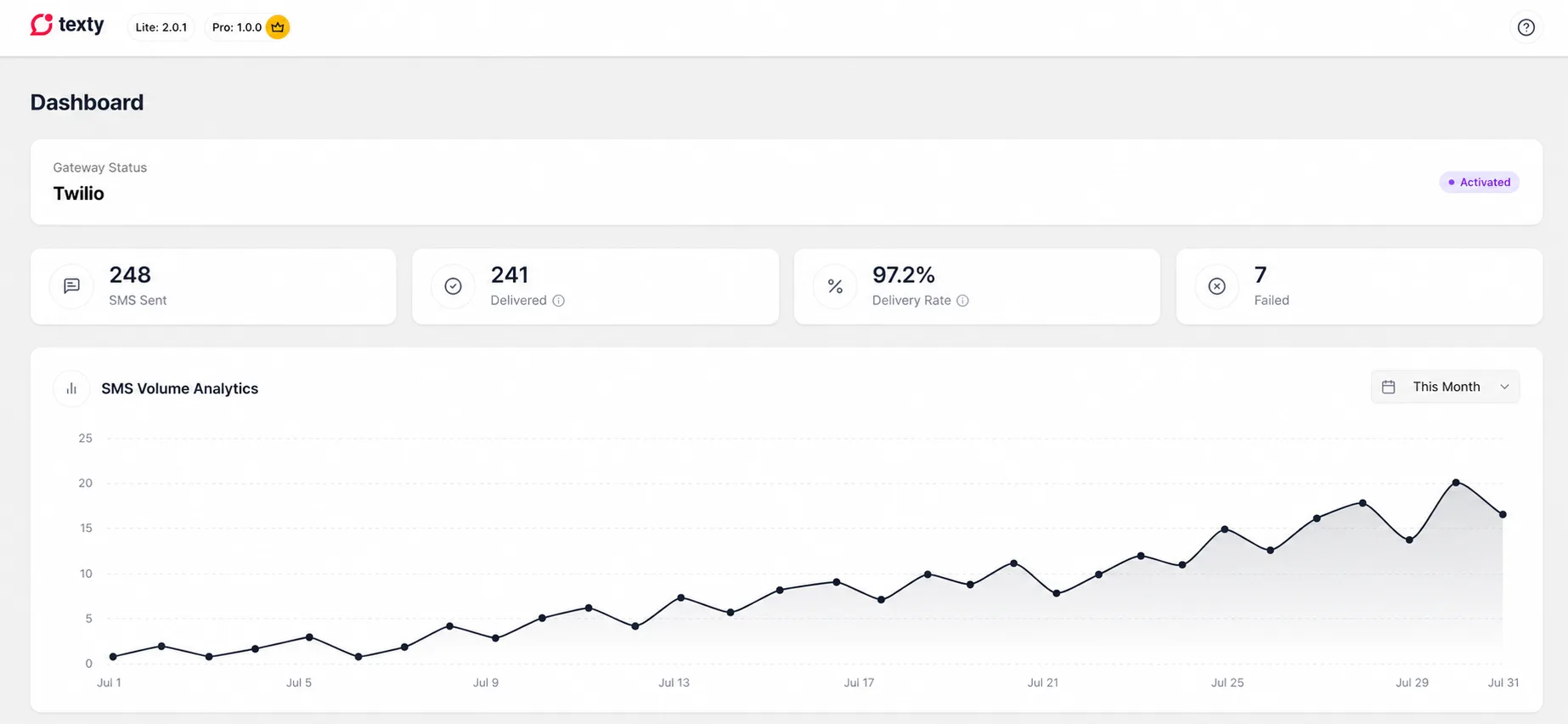
Go to Texty > Dashboard to review SMS volume, successful sends, failed sends, and the delivery rate. First, use the numbers to spot a change. Then open SMS Logs to find the messages behind it.
What does the Texty dashboard show?
Section titled “What does the Texty dashboard show?”The dashboard shows the active gateway and four key SMS metrics.
| Metric | What it means in Texty |
|---|---|
| SMS Sent | All SMS records created in the chosen period |
| Delivered | Messages accepted by the gateway without an error |
| Failed | Messages rejected with an error |
| Delivery Rate | Delivered divided by SMS Sent, shown as a percentage |
The volume chart shows how many SMS records were made each day or month. This helps you see busy periods and sudden changes.
How do you choose a date range?
Section titled “How do you choose a date range?”Go to Texty > Dashboard. Find the period menu above the volume chart.
Choose a range.
You can select:
- This Month.
- Last Month.
- Last 7 Days.
- Last 30 Days.
- This Year.
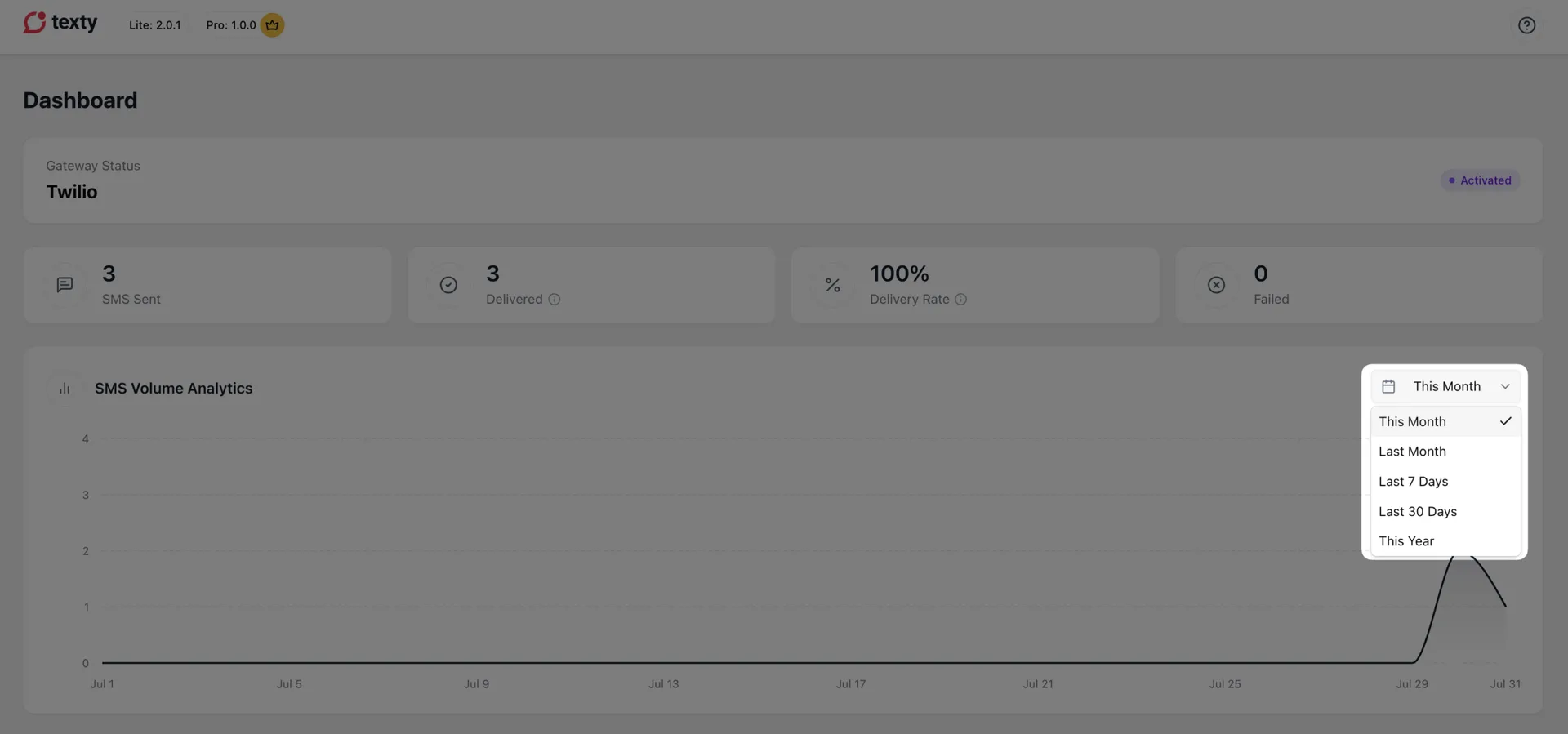
Texty updates each card and the chart when you change the period. The site time zone sets the start and end of each day. You can review it under Settings > General in WordPress.
How should you read the SMS Sent count?
Section titled “How should you read the SMS Sent count?”SMS Sent is the total record count for the period. It can include successful, failed, and pending records.
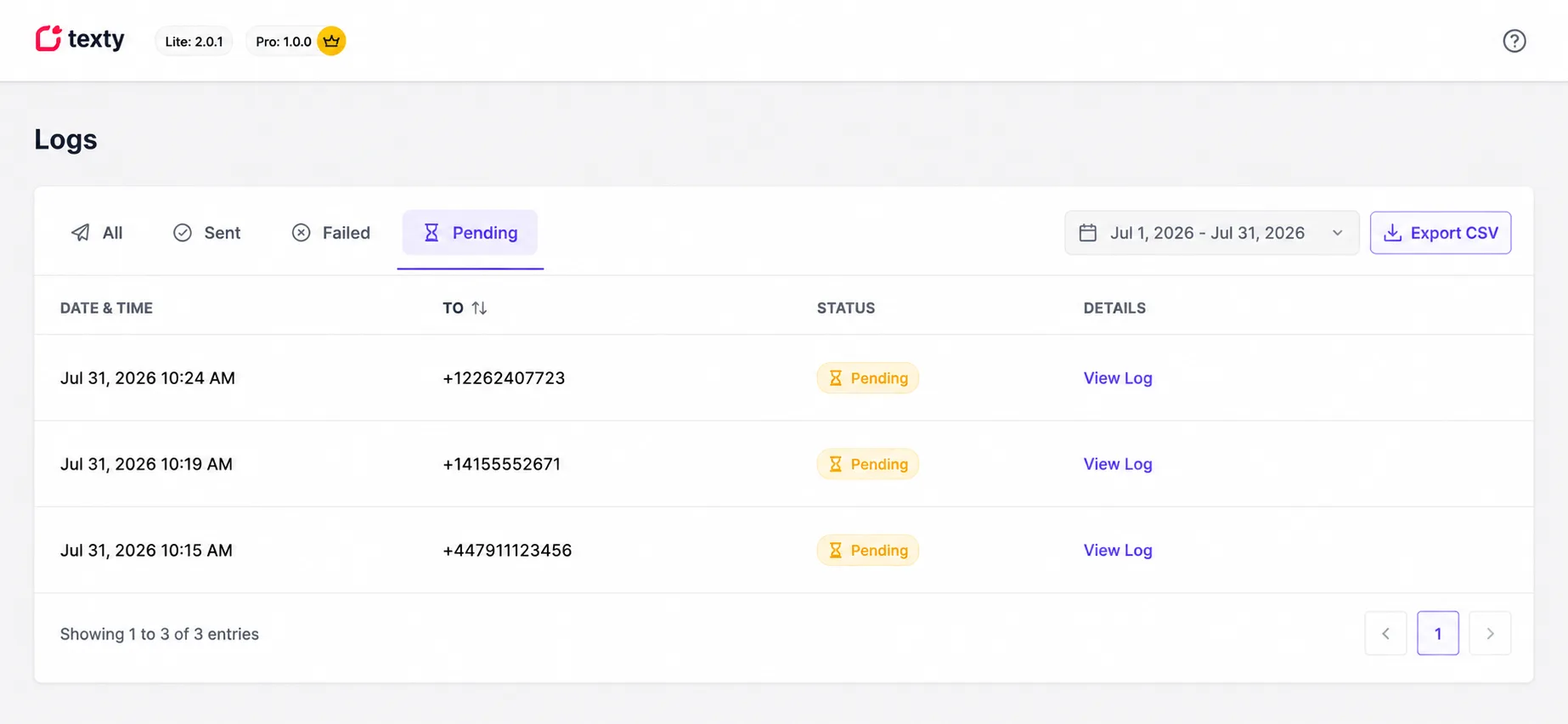
The total may be higher than Delivered + Failed when a pending record exists. A pending record also lowers the rate until its status changes.
For a message-level view, open Texty > Logs and select the Pending tab.
How do you use the dashboard to find a problem?
Section titled “How do you use the dashboard to find a problem?”Start with the delivery rate, then check the volume chart.
If the delivery rate drops
Section titled “If the delivery rate drops”- Open Texty > SMS Logs.
- Select Failed.
- Open a recent record with View Log.
- Read the gateway response.
- Check the same period in your gateway account.
A sharp drop can point to a bad key, low account funds, an unapproved sender, or a blocked route.
If SMS volume drops
Section titled “If SMS volume drops”Check whether your store had fewer events in that period. Did order or signup volume stay steady? Review the event toggles and the phone numbers.
Also make sure Pause All Notifications is off under Texty > Notifications > Settings.
If SMS volume rises without a clear reason
Section titled “If SMS volume rises without a clear reason”Open the logs and review the Type column. It shows which event made each message. Check for a test, a repeat order change, or an event turned on by mistake.
What can the dashboard not measure?
Section titled “What can the dashboard not measure?”Texty metrics do not show:
- Carrier-confirmed delivery.
- Link clicks or replies.
- Orders caused by an SMS.
- Gateway fees or SMS credit use.
Use the gateway report for carrier status and cost. Use WooCommerce or your web analytics tool to track sales and site actions.
Why do the dashboard numbers look wrong?
Section titled “Why do the dashboard numbers look wrong?”| What happened | What to check |
|---|---|
| No data appears | Choose a period with SMS activity and check SMS Logs. |
| Delivered is lower than expected | Review failed and pending records in SMS Logs. |
| The rate differs from the gateway | Texty measures gateway acceptance, while the provider may show carrier delivery. |
| The day totals look shifted | Check the WordPress time zone under Settings > General. |
| The chart does not load | Refresh the page, update Texty, and make sure the WordPress REST API works. |
| A sudden failure spike appears | Open recent failed logs and read the gateway response. |
Does Texty confirm that an SMS reached the phone?
Section titled “Does Texty confirm that an SMS reached the phone?”No. Texty records whether the gateway accepted or rejected the send. Check the gateway report for carrier delivery.
Why is SMS Sent higher than Delivered and Failed?
Section titled “Why is SMS Sent higher than Delivered and Failed?”The total can include pending records. Open the Pending tab in SMS Logs to review them.
Does Texty track sales from SMS?
Section titled “Does Texty track sales from SMS?”No. Use WooCommerce and your site analytics to track orders or other actions after an SMS.
Which metric should I watch most often?
Section titled “Which metric should I watch most often?”Watch the delivery rate and failed count together. A sudden change is more useful than a small day-to-day move.
What comes next?
Section titled “What comes next?”Please follow the remaining guides to make the most out of Texty.