How to Customize Texty SMS Messages With Dynamic Variables
You can edit each Texty alert and add tags for live data. A tag can add a user name, order number, or order status. Open the event, use only its listed tags, save the text, and run a test.
What is an SMS Dynamic Variable?
Section titled “What is an SMS Dynamic Variable?”A dynamic variable is a placeholder inside an SMS template. For example, Texty replaces \{order_id} with the real order number when an order alert runs.
The person sees the final value, not the tag.
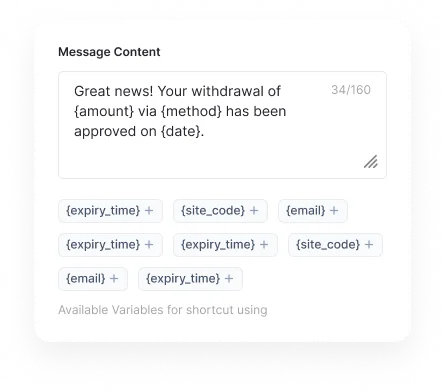
Important: Each event has its own tags. An order tag will not work in a comment alert. Use the list shown inside the event.
How do you edit an SMS message?
Section titled “How do you edit an SMS message?”Go to Texty > Notifications. Open User Events or Integrations. Expand the event you want to change. Edit the message. Add tags from the list shown for that event.

Save the event.
Trigger the event with test data.
Check the final text on the phone and in Texty > SMS Logs.
Type each tag just as shown, with the curly braces. Keep the lowercase letters and underscores.
Which tags work in every alert?
Section titled “Which tags work in every alert?”These two tags work in all built-in Texty alerts.
| Merge tag | What it adds | Example |
|---|---|---|
\{site_name} | Your WordPress site title | Acme Supply |
\{site_url} | Your site home URL | https://acme.example |
Which tags work for signup alerts?
Section titled “Which tags work for signup alerts?”Use these tags in the New User Registration event.
| Merge tag | What it adds |
|---|---|
\{user_id} | New user’s account ID |
\{username} | WordPress username |
\{email} | Account email |
\{display_name} | Display name |
\{first_name} | First name |
\{last_name} | Last name |
\{role} | WordPress user role |
Example:
New user on {site_name}: {username} ({email}).Which tags work for comment alerts?
Section titled “Which tags work for comment alerts?”Use these tags in the New Comment event.
| Merge tag | What it adds |
|---|---|
\{author} | Comment author’s name |
\{email} | Comment author’s email |
\{author_url} | Website entered with the comment |
\{comment} | Comment text |
\{ip} | Comment author’s IP address |
\{post_id} | Post ID |
\{post_title} | Post title |
\{post_url} | Link to the post |
Example:
New comment on {post_title} by {author}. Review: {post_url}Add the full comment only if your team needs it. A long comment can turn one SMS into many billed parts.
Which tags work for store and vendor alerts?
Section titled “Which tags work for store and vendor alerts?”WooCommerce staff, buyer, and Dokan vendor events use the same order tags.
| Merge tag | What it adds |
|---|---|
\{order_id} | Order number |
\{items} | Product names and quantities |
\{date} | Order date |
\{status} | Current order status |
\{payment_method} | Payment method |
\{shipping_method} | Shipping method |
\{transaction_id} | Payment reference |
\{billing_name} | Customer name |
\{billing_email} | Customer email |
\{order_total} | Order total |
\{shipping_total} | Shipping cost |
\{tax_total} | Tax amount |
\{discount} | Discount amount |
Example for a buyer:
Hi {billing_name}, order #{order_id} is now {status}. Thank you, {site_name}.Example for store staff:
Order #{order_id} is {status}. Total: {order_total}. Paid by {payment_method}.The \{items} value can grow when an order has many goods. Test it with a real size order before you go live.
How long should an SMS be?
Section titled “How long should an SMS be?”Keep the text short and easy to scan. A basic SMS often fits up to 160 standard signs. Some symbols and non-Latin text can cut that limit. A long message may split into more than one billed part.
Tags can make the final length hard to guess. Test with long names, many goods, and a full URL before you go live.
Put the key update first. Avoid private data that the recipient does not need.
Which SMS templates can you start with?
Section titled “Which SMS templates can you start with?”| Event | Template |
|---|---|
| New user | New user on \{site_name}: \{username} (\{email}). |
| New comment | New comment on \{post_title} by \{author}. |
| Customer order update | Hi \{billing_name}, order #\{order_id} is now \{status}. |
| Admin order alert | Order #\{order_id} is \{status}. Total: \{order_total}. |
| Dokan vendor alert | Order #\{order_id} is \{status}. Items: \{items}. |
Use these as a base. Test each one with the event and phone that will use it.
Why is a tag not working?
Section titled “Why is a tag not working?”| What happened | What to check |
|---|---|
| The raw tag appears in the SMS | Make sure the tag is listed for that event. |
| The tag is empty | Check whether the test user, comment, or order contains that value. |
| The wrong value appears | Check that you used the right event and test data. |
| The message is too long | Remove less useful tags, long URLs, or the full \{items} list. |
| No new message was sent | Check the event toggle, active gateway, and global pause control. |
Can I use WooCommerce order tags in Dokan alerts?
Section titled “Can I use WooCommerce order tags in Dokan alerts?”Yes. Built-in Dokan alerts use the same order tags as WooCommerce alerts.
Are Texty dynamic variables case sensitive?
Section titled “Are Texty dynamic variables case sensitive?”Enter them exactly as shown. For example, use {order_id}, not {Order_ID}.
Can I add my company name to every SMS?
Section titled “Can I add my company name to every SMS?”Yes. Open Texty > Notifications > Settings and turn on the company name. Keep it short because it adds to each message.
Can I pause all notification messages?
Section titled “Can I pause all notification messages?”Yes. Open Texty > Notifications > Settings and turn on the company name. Keep it short because it adds to each message.
Yes. Use the global pause control under Texty > Notifications > Settings. Turn it off and run a new test when you are ready.
What comes next?
Section titled “What comes next?”Please follow the remaining guides to make the most out of Texty.