By Shakhawat Ullah
17 Min Read
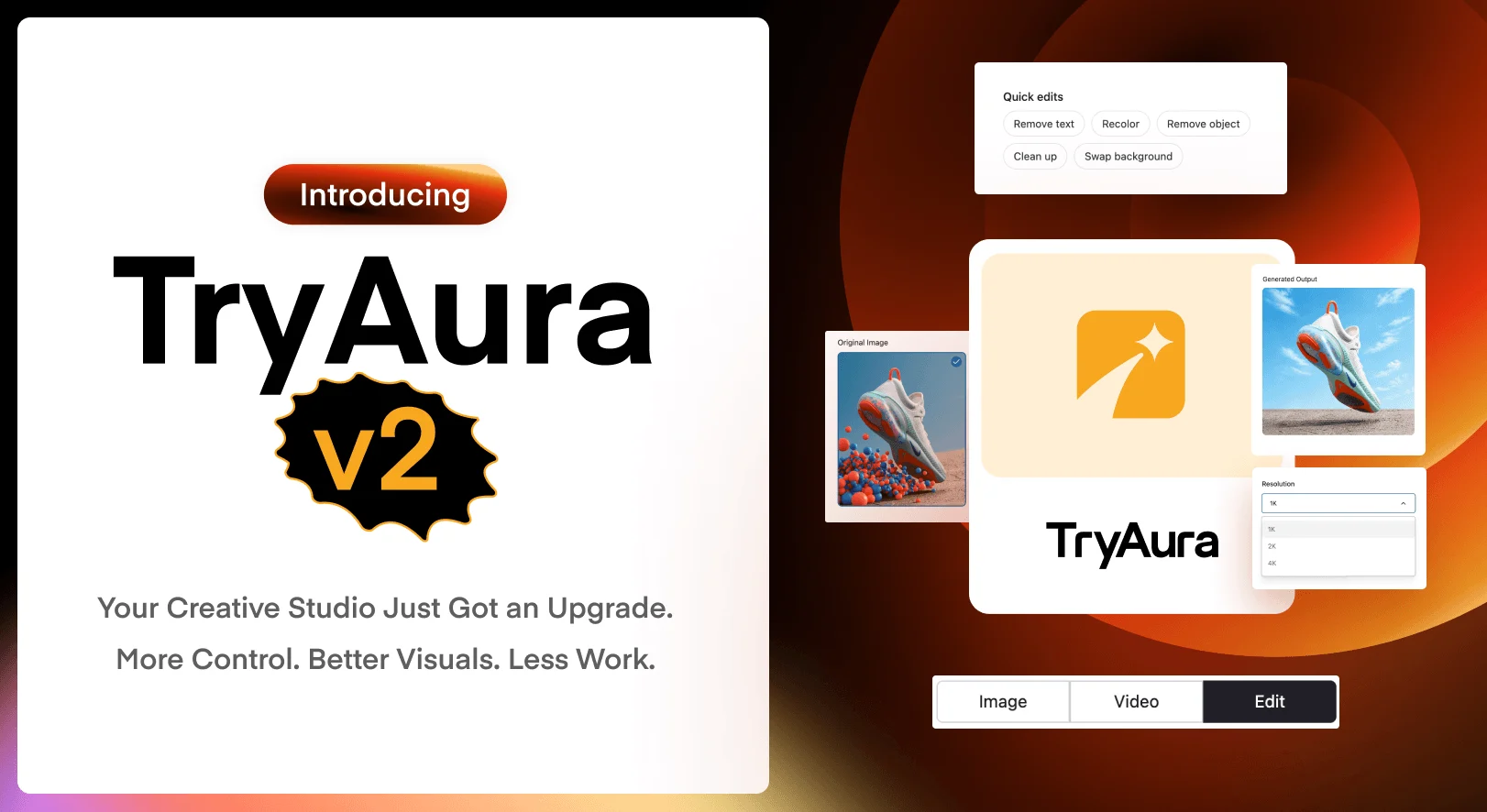
Introducing TryAura v2 🎊
Most WooCommerce stores do not have a product problem. They have a visual production problem.
One product photo has to do too many jobs. It needs to become a clean catalog image, a lifestyle scene, an ad creative, an on-model visual, and sometimes a product video. If one detail looks wrong, the usual answer is to start again.
That is the workflow we wanted to change.
TryAura V2 gives store owners more control over how product visuals are created, corrected, reused, and published. It helps you keep products accurate, fix images without generating them again, and create more polished video content from the photos you already have.
The result is not simply more AI features. It is a faster and more practical product visual workflow built inside WooCommerce.
What Is TryAura V2?
Our latest release to TryAura gives it a major upgrade over the AI visual studio workflows in WooCommerce.
TryAura Lite now gives store owners more control over image creation with reference images, ready-made scenes, negative prompts, new aspect ratios, and image output up to 4K. It also adds automatic AI alt text to every image generated and a natural On Model photoshoot.
With TryAura Pro, you can save the presets, enable image editing, Ghost Mannequin visuals, and advanced controls for AI product video generation.
Product image generation, product video creation, and virtual try-on were already part of TryAura. V2 makes those existing workflows more accurate, flexible, and useful for everyday store operations.
TryAura V2 At A Glance
| Workflow | TryAura Lite | TryAura Pro |
|---|---|---|
| Create product images | Reference images, ready-made scenes, negative prompts, eight aspect ratios, and 1K, 2K, or 4K output | Everything in Lite plus curated looks and reusable saved looks |
| Edit product images | Available with TryAura Pro | Remove text or objects, recolour products, clean up imperfections, replace backgrounds, and write custom edit instructions |
| Create apparel visuals | Natural On Model output | On Model and Ghost Mannequin output |
| Create product videos | Available with TryAura Pro | 15 camera motions, first and last frame control, video references, negative prompts, flexible duration, and up to 4K output on supported models |
| Publish product visuals | Automatic AI alt text and WordPress Media Library integration | Everything in Lite with the complete image and video workflow |
| Virtual try-on | Unlimited virtual try-on with your own Gemini API key | Everything in Lite |
Why We Released V2
The latest release from TryAura came from a simple pattern in user feedback. Store owners did not only want more generations. They wanted more control over the result.
They wanted a product to keep its real shape. They wanted a background to match the campaign. They wanted to correct one imperfect detail without losing everything that already looked right. They wanted product videos to feel directed rather than random.
These are some of the feedback that shaped the new additions.
Enhanced product accuracy
A beautiful product image has little value if the product no longer looks like the item a customer will receive.
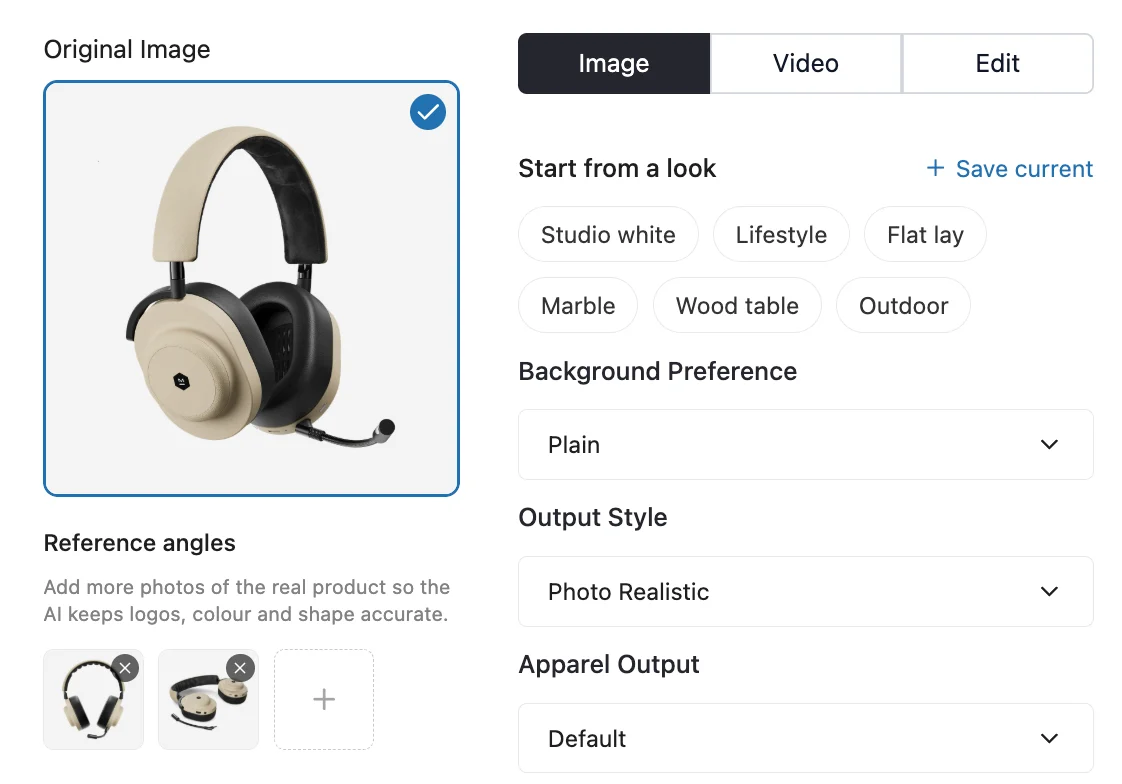
That is why reference images are one of the most important additions in V2. You can provide extra product shots so TryAura has more visual information about shape, colour, text, materials, and small details.
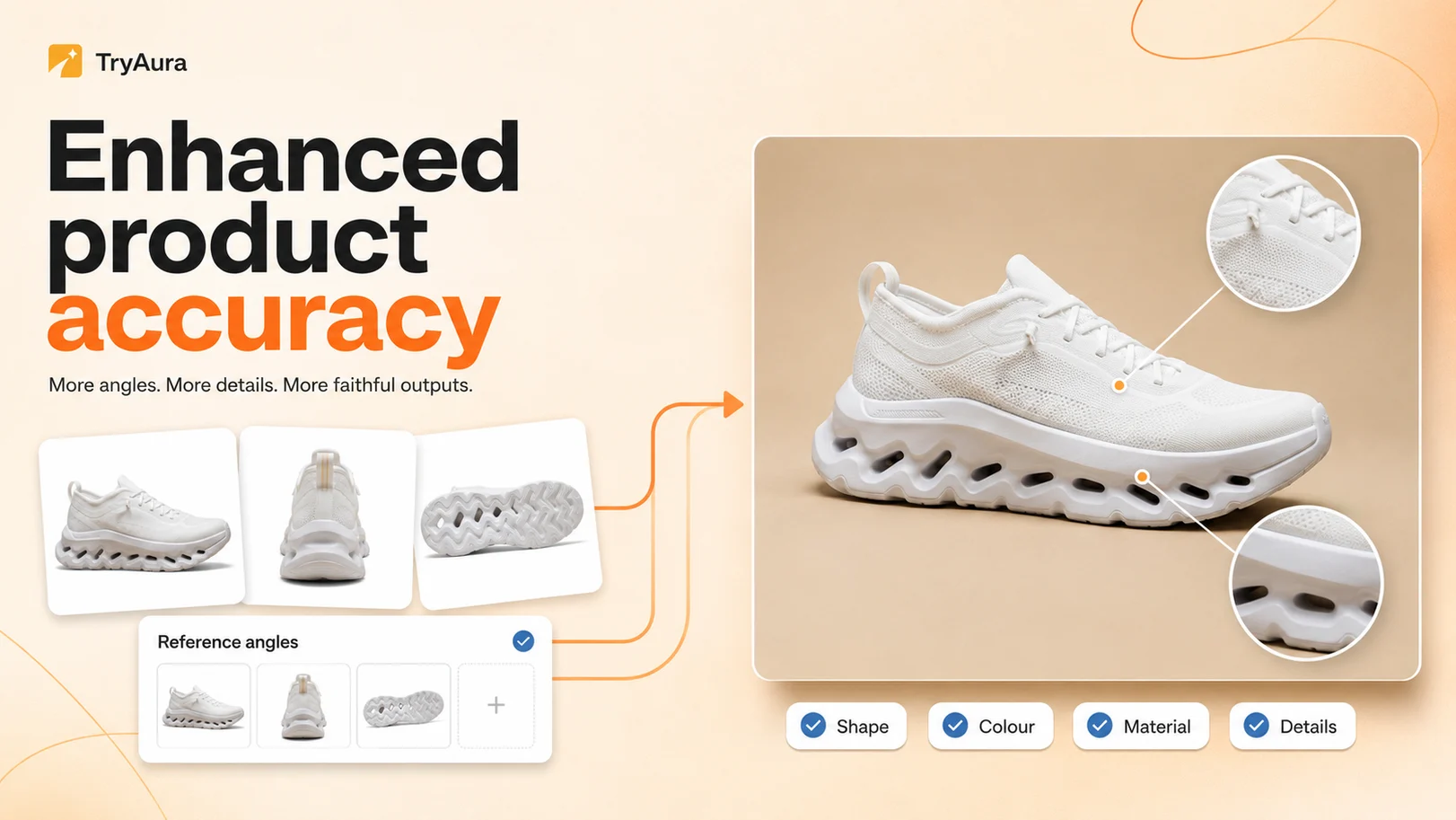
Negative prompts add another layer of control. They let you describe what should not appear in the image, which helps reduce unwanted objects, visual artifacts, and off-brand details.
Creative control had to feel simple
Most store owners are not prompt engineers. They should not need to become one to create a polished product image.
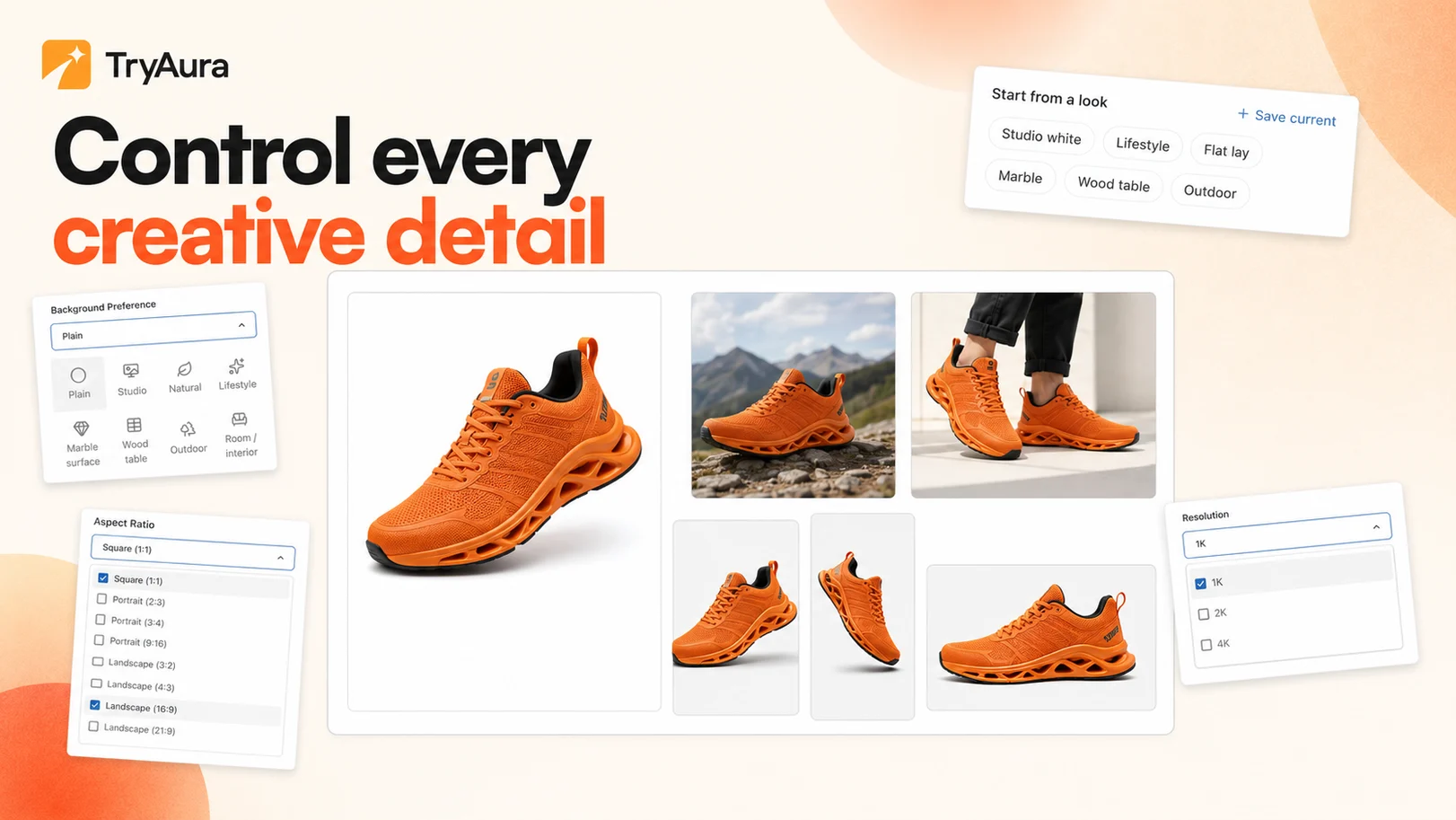
V2 introduces ready-made scenes and reusable looks so merchants can start with a clear visual direction. A studio white shot, marble setting, lifestyle scene, wood table, flat lay, or outdoor image can begin with a selection instead of a long description.
Users who want more control can still write their own instructions. The difference is that a strong starting point is now built into the workflow.
A small correction should not require a restart
Sometimes an image is almost ready. The product looks right, the composition works, and the lighting feels natural. Only one object, colour, label, or background needs attention.
Generating the whole image again is slow and unpredictable.
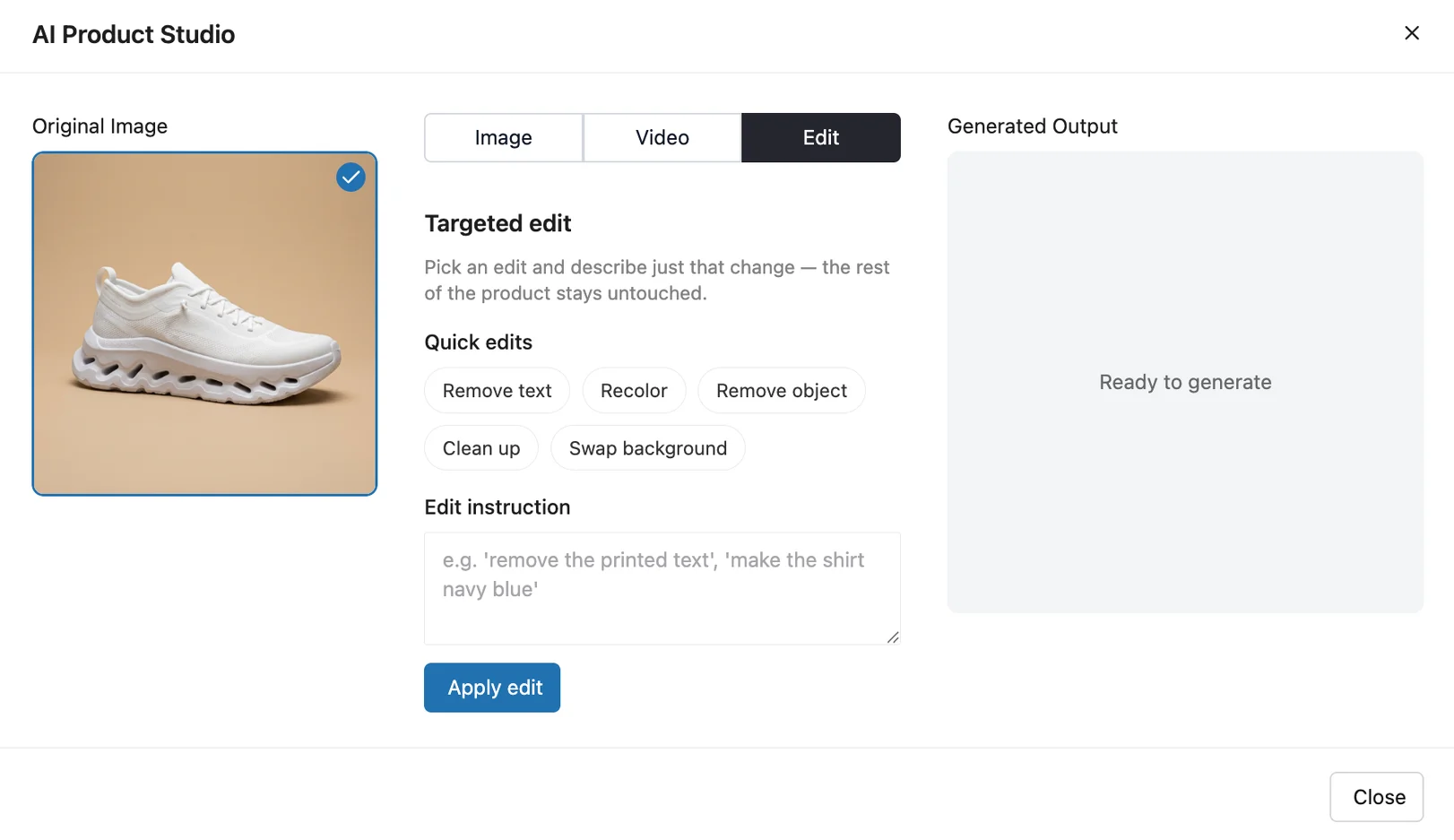
The new Edit workflow in TryAura Pro lets you target the problem instead. You can remove text, recolour a product, remove an unwanted object, clean up imperfections, replace the background, or describe a custom change.
The goal is simple. Keep what works and change only what does not.
The full workflow should stay inside WooCommerce
TryAura was built to remove the back and forth between several tools. Product pages, AI tools, editing software, download folders, and the WordPress Media Library should not feel like separate workflows.
V2 continues that direction. Images, edits, videos, alt text, and generated assets remain connected to the WooCommerce and WordPress workflow that store owners already use.
You spend less time moving files and more time improving the product page.
What’s New In TryAura Lite
TryAura remains a practical starting point for WooCommerce stores that want better product visuals without a complicated creative workflow.
V2 gives Lite users more ways to direct the image while keeping the interface approachable.

Keep products accurate with reference images
You can now attach additional photos of the same product before generating an image.
A front view, side view, detail shot, or packaging image gives TryAura more information to work with. This is useful for products with distinctive shapes, printed text, logos, patterns, fasteners, handles, or colour details that must remain consistent.
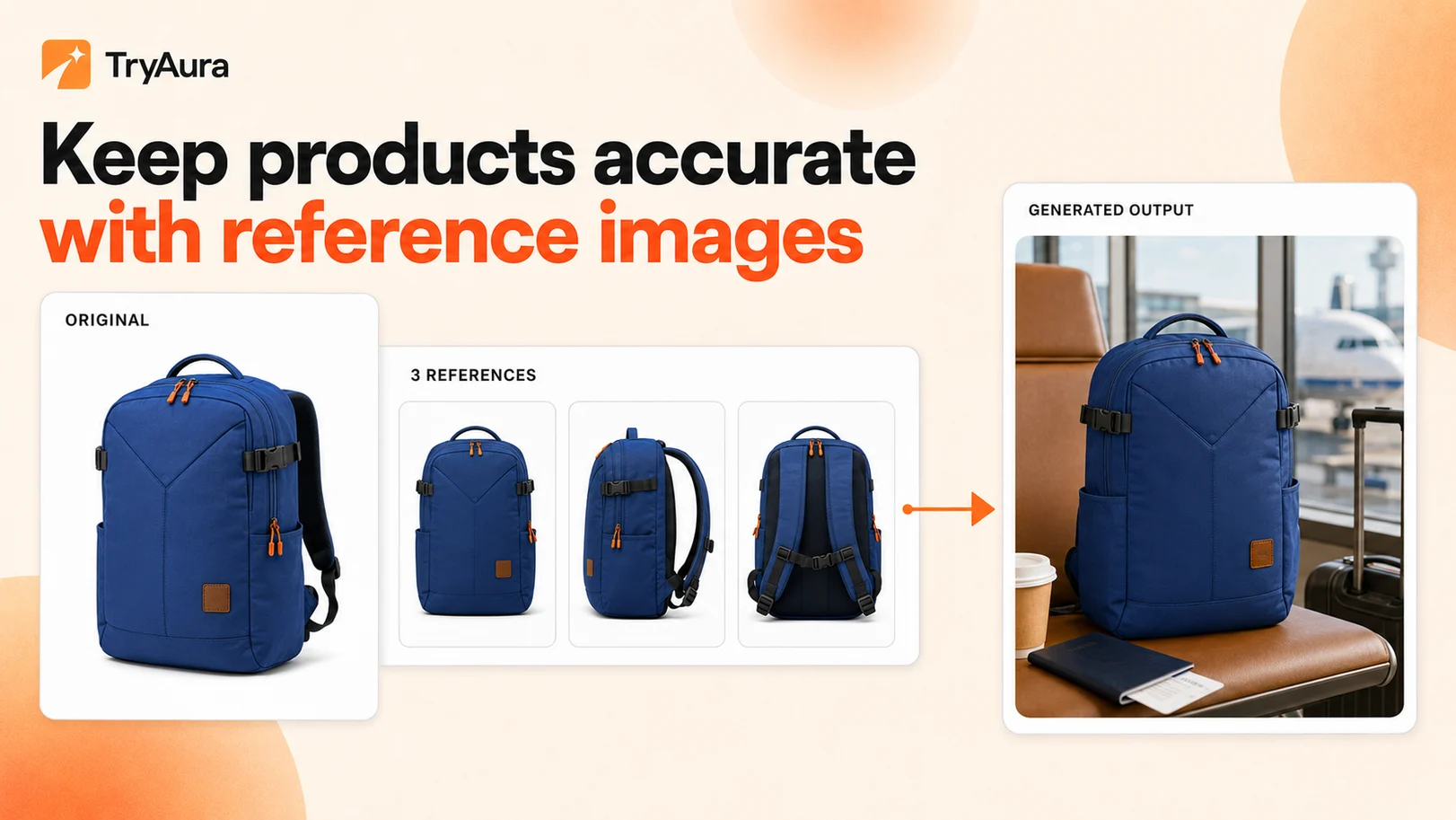
For example, a handbag seller can provide front, side, and close-up images. TryAura can use those references when placing the bag into a lifestyle scene, reducing the risk of changing its structure or hardware.
Choose a scene instead of describing it
Scene and background staging makes art direction much faster.
Choose from ready-made settings such as studio white, lifestyle, marble, wood table, outdoor, and more. The selected scene gives TryAura a clear starting point without requiring a detailed prompt.
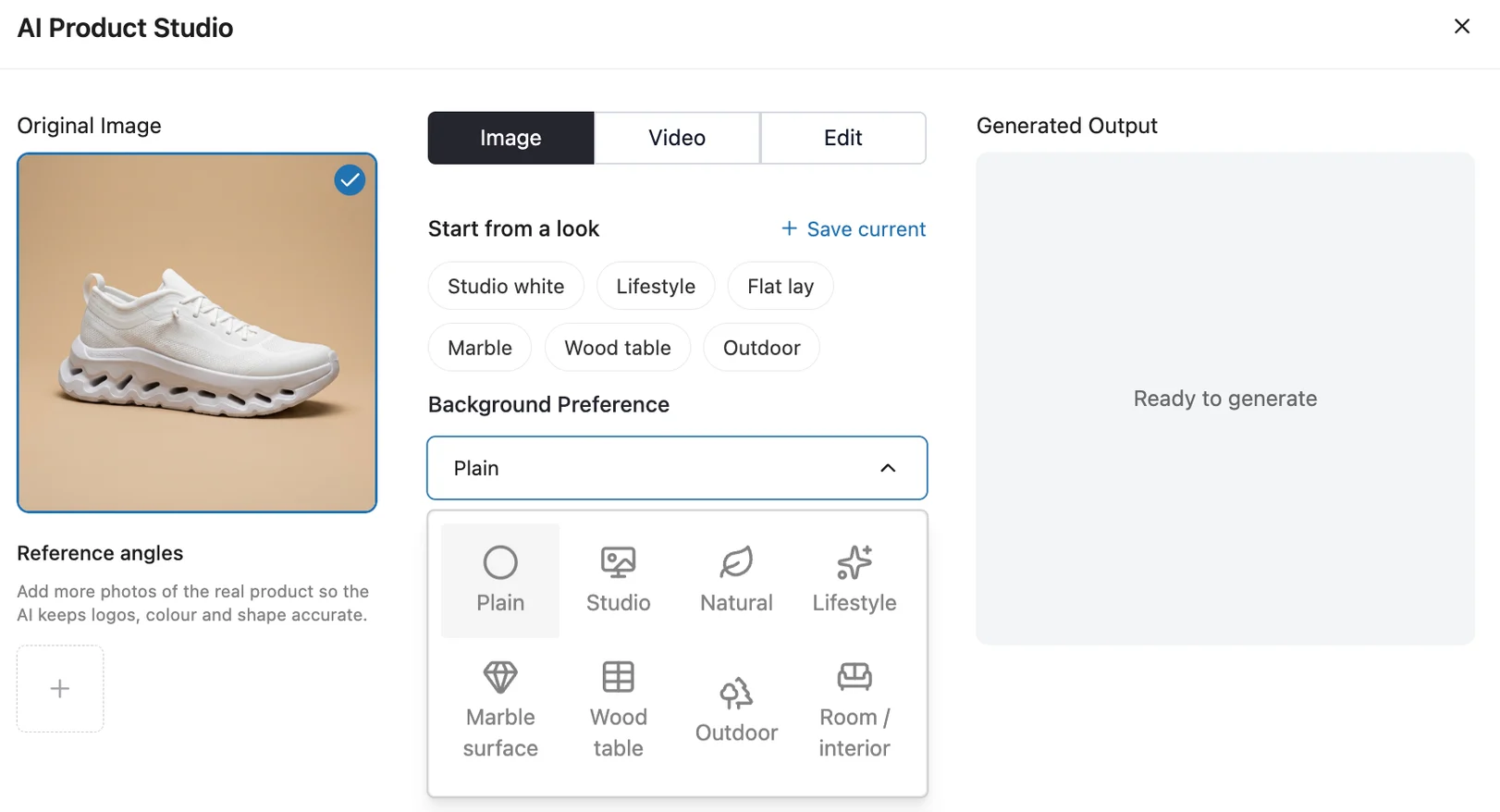
This is helpful when you need a consistent set of product images across a collection or a quick visual for a seasonal campaign.
If you want to dive deeper on how to improve your product photos with TryAura, this guide can help you out.
Generate images in 1K, 2K, or 4K
Our newest TryAura version adds image resolution control for 1K, 2K, and 4K output.
TryAura automatically uses a supported model for the resolution you choose. This gives you a clearer path from a quick draft to a high-resolution visual for product pages, landing pages, ads, and other campaigns.
Aspect Ratio replaces the older Image Size label. You can choose from the eight ratios supported by the model.
- 1:1
- 2:3
- 3:2
- 3:4
- 4:3
- 9:16
- 16:9
- 21:9
That covers common square, portrait, landscape, story, banner, and widescreen placements without showing options that the model cannot reliably create.
Tell TryAura what to avoid
Image negative prompts let you describe what should not appear in a generated visual.
You can ask TryAura to avoid extra objects, duplicate products, unwanted text, distracting props, distorted details, or a visual style that does not fit your brand.
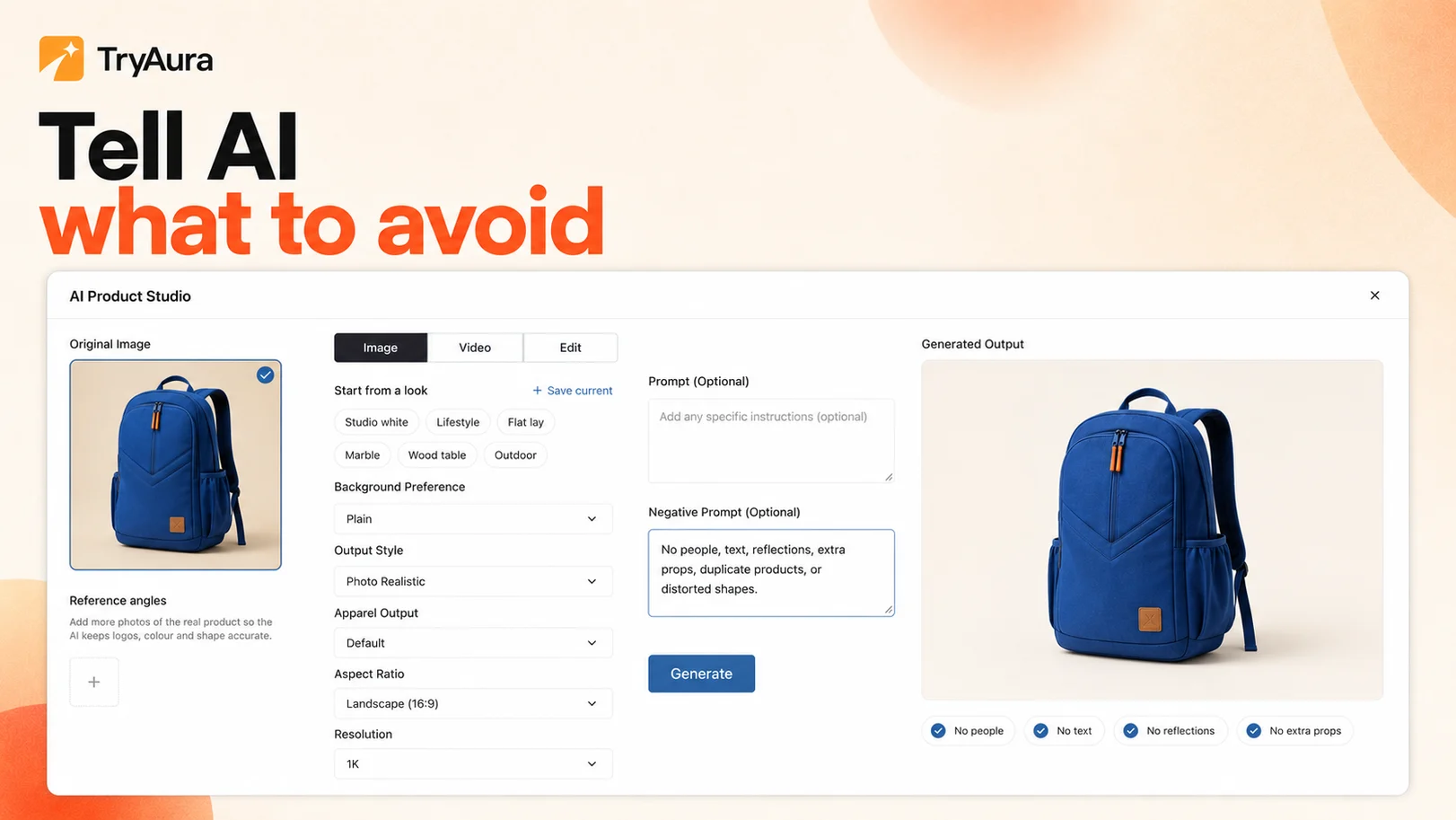
This works alongside your main instruction. One tells TryAura what you want. The other helps define what should stay out.
Publish with automatic AI alt text
Every generated image now receives descriptive AI alt text automatically.
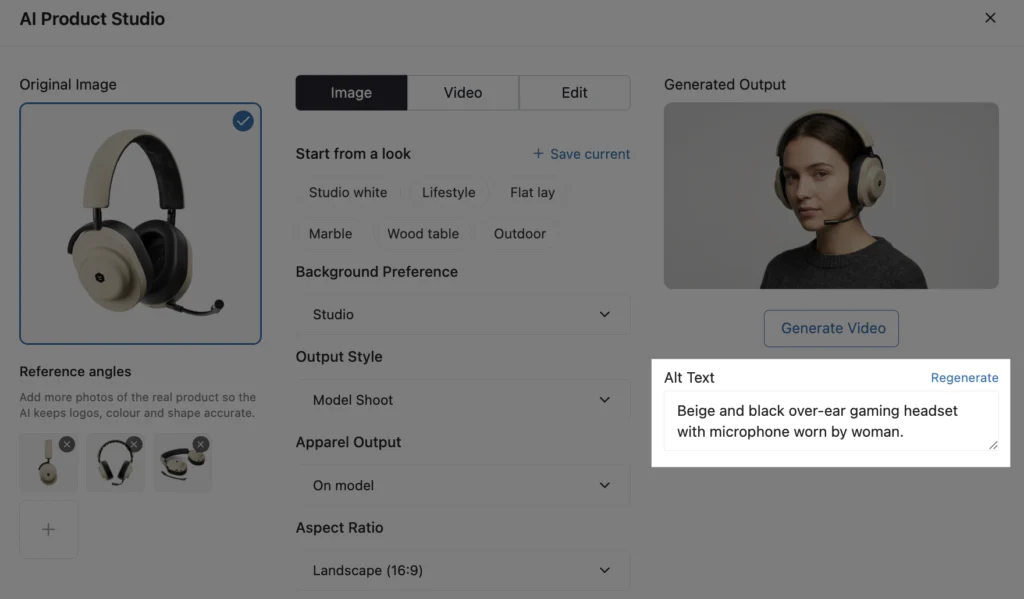
Alt text helps people who use screen readers understand an image. It also gives search engines useful context about the visual. Automating this step makes it easier to publish product images with better accessibility and image SEO.
Create natural On Model apparel visuals
Apparel sellers can now show a garment naturally worn by a model.
This gives shoppers more visual context around shape, styling, and how an item sits when worn. It also gives fashion stores another way to expand a product gallery without arranging a new model shoot for every item.
What’s New In TryAura Pro
TryAura Pro turns the improved image workflow into a more complete create, edit, and animate system.
It is designed for merchants, growing brands, and agencies that need repeatable visual direction, image correction, and product video controls.
Start faster with curated looks
The Start from a Look library includes six curated options.
- Studio white
- Lifestyle
- Flat lay
- Marble
- Wood table
- Outdoor
Each look can fill in the prompt, negative prompt, background, output style, and aspect ratio for you.
You can also save your own reusable looks. Saved looks are connected to your account, so they can follow you across browsers and devices.
This is useful when every product in a collection needs the same visual language. Instead of rebuilding the setup for each item, you can start from the same approved look.
Edit an existing product image

The new Edit tab lets Pro users improve an image without generating it from the beginning.
Quick edits include
- Remove text
- Recolour
- Remove an object
- Clean up
- Swap the background
You can also write a custom edit instruction for changes that do not fit a preset action.
This gives merchants a practical correction workflow. A nearly perfect image no longer needs to be discarded because of one distracting prop, an unwanted label, or the wrong background.
Clean up product images without changing the product
The image edit feature can remove wrinkles, dust, lint, and blemishes while protecting important product details such as shape, colour, text, and logos.
An apparel store can clean lint from a dark garment. A beauty brand can remove dust from packaging. An accessories seller can tidy a background while preserving the item itself.
Create Ghost Mannequin apparel images
Pro users can create Ghost Mannequin visuals that show a garment in its natural worn shape without a visible body.
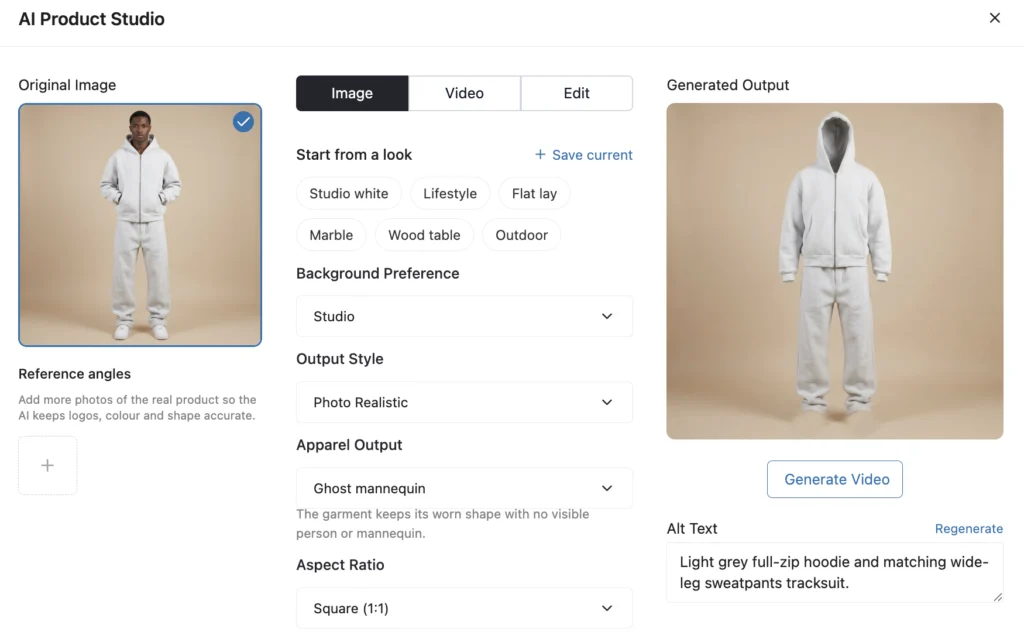
This presentation style is useful for product pages where the garment should remain the focus. It can help fashion stores build cleaner and more consistent apparel catalogs without preparing a physical mannequin shoot for every product.
Direct product videos with 15 camera motions
TryAura Pro now offers 15 camera motion options.
The list includes a 360 degree spin, slow orbit, push in, pull back reveal, hero reveal, top-down descend, detail glide, rack focus, and tilt-up reveal.
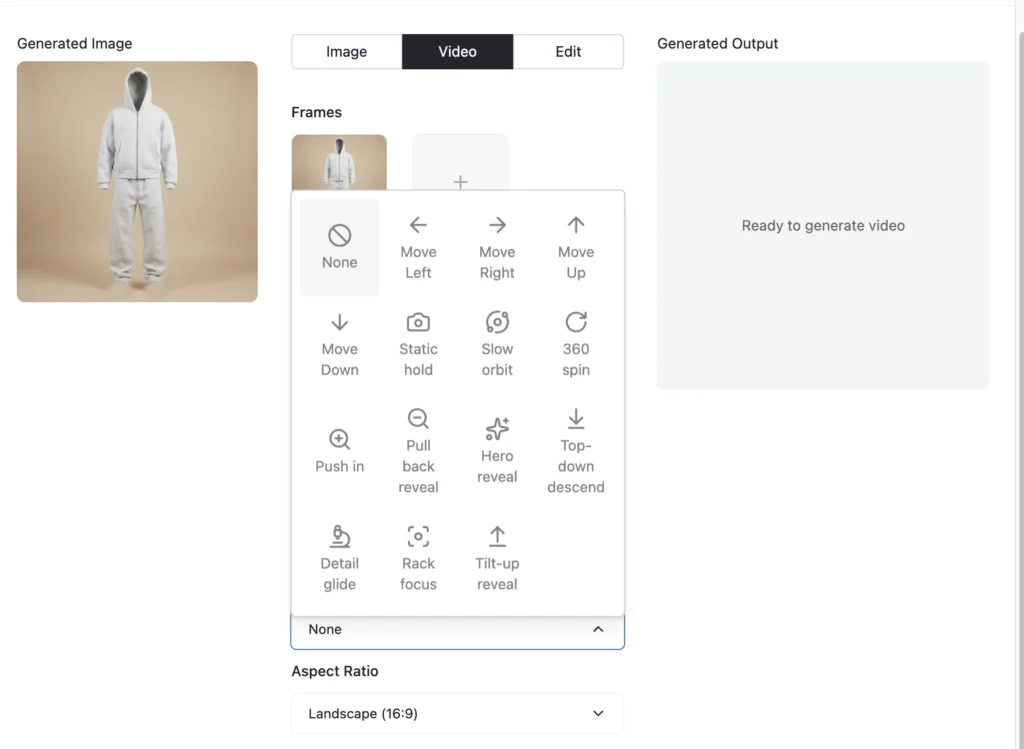
Instead of asking for generic movement, you can choose a motion that fits the product and the purpose of the video. A 360 degree spin can show overall form. A detail glide can highlight material or finish. A hero reveal can work well for a launch creative.
Control the first and last frame
First and last frame control lets you set how a product video begins and ends.
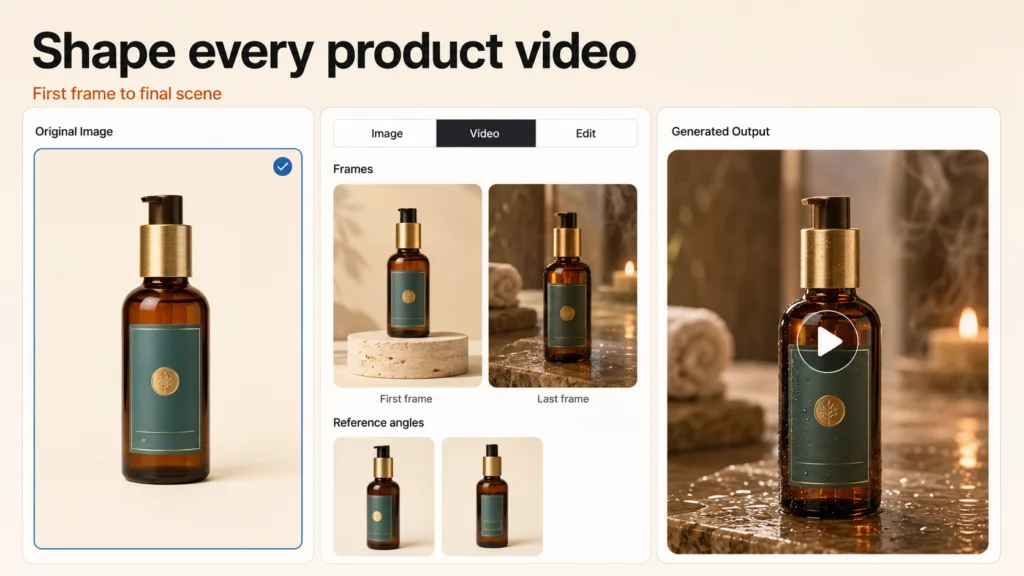
TryAura generates the movement between those two frames. This gives you more influence over the visual story and makes it easier to create a reveal, transformation, or camera move with a clear destination.
Use reference images throughout a video

Video reference images help TryAura keep the product accurate across the clip.
That matters because consistency becomes more difficult when an image starts moving. Extra references give the model more information about the real product while it generates different frames.
Choose the video duration and output quality
Pro users can select 4, 6, or 8 second video durations.
Video output is available in 720p and 1080p, with 4K available on models that support it. You can also write a video negative prompt to describe details, movements, or visual elements that should not appear.
Together, these controls make it easier to prepare clips for a product gallery, landing page, advertisement, or social post.
How Can WooCommerce Stores Use TryAura V2
The value of version 2 becomes clearer when the features are connected to real store work.
Turn one product photo into a campaign
A store may begin with one clean supplier image or a basic product shot.
With TryAura Lite, that image can become a studio visual, a lifestyle scene, a portrait creative, a wide banner, or an on-model apparel image. Reference images help protect the product while different scenes and aspect ratios prepare it for more placements.
The same product can appear across a product page, homepage, email, advertisement, and social campaign without needing a separate shoot for every format.
Fix the image that is almost right
A product image may have the right product and composition but the wrong background. It may contain a distracting object, visible lint, unwanted text, or a colour that needs correction.
TryAura Pro lets you target that change instead of starting again.
This can reduce the cycle of regenerating images, comparing versions, and hoping the next output keeps everything you already liked.
Build a consistent catalog
Different suppliers, cameras, lighting conditions, and editing styles can make a WooCommerce catalog feel disconnected.
Ready-made scenes help Lite users create a clearer visual direction. Reusable looks in Pro make that direction easier to repeat across products, collections, browsers, and devices.
This is useful for stores that add products regularly and agencies that manage visuals for several WooCommerce sites.
Create apparel visuals without several separate shoots
Fashion stores often need several presentations of the same garment.
An On Model image can show how the garment looks when worn. A Ghost Mannequin image can keep attention on shape and construction. Virtual try-on can then help a shopper preview the product from the storefront.
These workflows solve different parts of product presentation while staying connected to the same WooCommerce product.
Turn still images into product videos
A static photo can show colour and shape, but motion can reveal more context.
TryAura Pro can turn an existing image into a short product video. Camera motions, frame control, references, duration, resolution, and negative prompts give merchants more influence over the result.
The output can be used in product galleries, launch pages, social posts, and advertisements without requiring a traditional video production day.
Refresh visuals when the campaign changes
Product inventory may remain the same while the campaign changes throughout the year.
A merchant can move a product from a clean catalog scene to a seasonal lifestyle setting. The same workflow can resize it for a new channel, remove an outdated background, and prepare a short campaign video.
This makes visual production more responsive without changing the underlying product listing.
What Else Improved In TryAura V2
V2 also includes smaller workflow improvements that make TryAura easier to use.
A clearer Image, Video, and Edit workflow
The enhancer tabs are now named Image, Video, and Edit.
The shorter labels make it easier to understand where each task belongs.
Cancel a generation that is already running
Closing an active generation now cancels it instead of locking the window until the process ends.
This gives users a quicker way to stop an accidental generation or change direction.
Background and style choices now work as expected
Generated images now follow the selected Background Preference and Output Style instead of forcing a try-on model.
This makes the chosen creative direction more reliable.
What Did We Fix?
The release also addresses several issues that interrupted image, video, and try-on workflows.
- Fixed image, video, and virtual try-on generation failures after the Gemini model upgrade
- Fixed older image models returning 1K output when 2K was selected
- Fixed repeated video generation failures
- Improved video prompt fidelity
- Improved how video errors are shown to users
- Fixed video thumbnails that could remain stuck while a video was being generated
These fixes matter because creative control only has value when the workflow is dependable.
What Remains Part of TryAura
TryAura Version 2 builds on the core product rather than replacing it.
Users can still
- Generate product images from existing WooCommerce visuals
- Create product videos with paid plans
- Enable virtual try-on on shop and product pages
- Save generated assets to the WordPress Media Library
- Reuse images and videos across products, pages, posts, and campaigns
- Connect their own Gemini API key
- Generate without a TryAura credit system
Everything continues to work inside WooCommerce, with no separate visual production dashboard to manage.
If you are new to the product, read our introduction to TryAura or explore the complete TryAura feature list.
How to get TryAura V2
Existing users can update TryAura from the Plugins screen in WordPress.
If you use a paid plan, make sure both TryAura and TryAura Pro are updated to the latest available versions so the Lite and Pro features work together.
New users can download TryAura Lite from WordPress.org and connect their own Gemini API key to begin creating product images and enabling virtual try-on.
For setup help, visit the TryAura documentation.
For practical image creation tips, read our guide on how to improve product photos with AI and the complete AI product photography guide for WooCommerce.
Common Questions You Might Have
What is TryAura V2
TryAura V2 is a major update to the TryAura product visualization plugin for WooCommerce. It adds more control over AI product image creation, targeted image editing, reusable looks, apparel output, and product video generation.
What’s new in TryAura Lite
TryAura Lite now includes reference images, ready-made scenes, and 1K, 2K, or 4K image output. It also adds image negative prompts, automatic AI alt text, eight supported aspect ratios, and On Model apparel visuals.
What’s new in TryAura Pro
TryAura Pro includes everything in Lite. It adds six curated looks, reusable saved looks, targeted image editing, product cleanup, and Ghost Mannequin visuals. Video features include 15 camera motions, first and last frame control, references, flexible duration, and up to 4K output on supported models.
Can TryAura V2 keep my product accurate
Reference images give TryAura more information about the real shape, colour, text, materials, and details of a product. Negative prompts also help you describe what should not appear. Output quality still depends on the clarity and relevance of the source images.
Can I edit an existing product image with TryAura
Yes. TryAura Pro users can remove text or objects, recolour products, clean up imperfections, replace backgrounds, and write custom edit instructions without generating the entire image again.
Can TryAura create Ghost Mannequin images
Yes. Ghost Mannequin apparel output is available with TryAura Pro. TryAura Lite includes natural On Model apparel output.
What product video controls are available
TryAura Pro includes 15 camera motions, first and last frame control, video reference images, and editable negative prompts. You can choose a 4, 6, or 8 second duration and 720p or 1080p output. Up to 4K output is available when the selected model supports it.
Does TryAura V2 still include virtual try-on
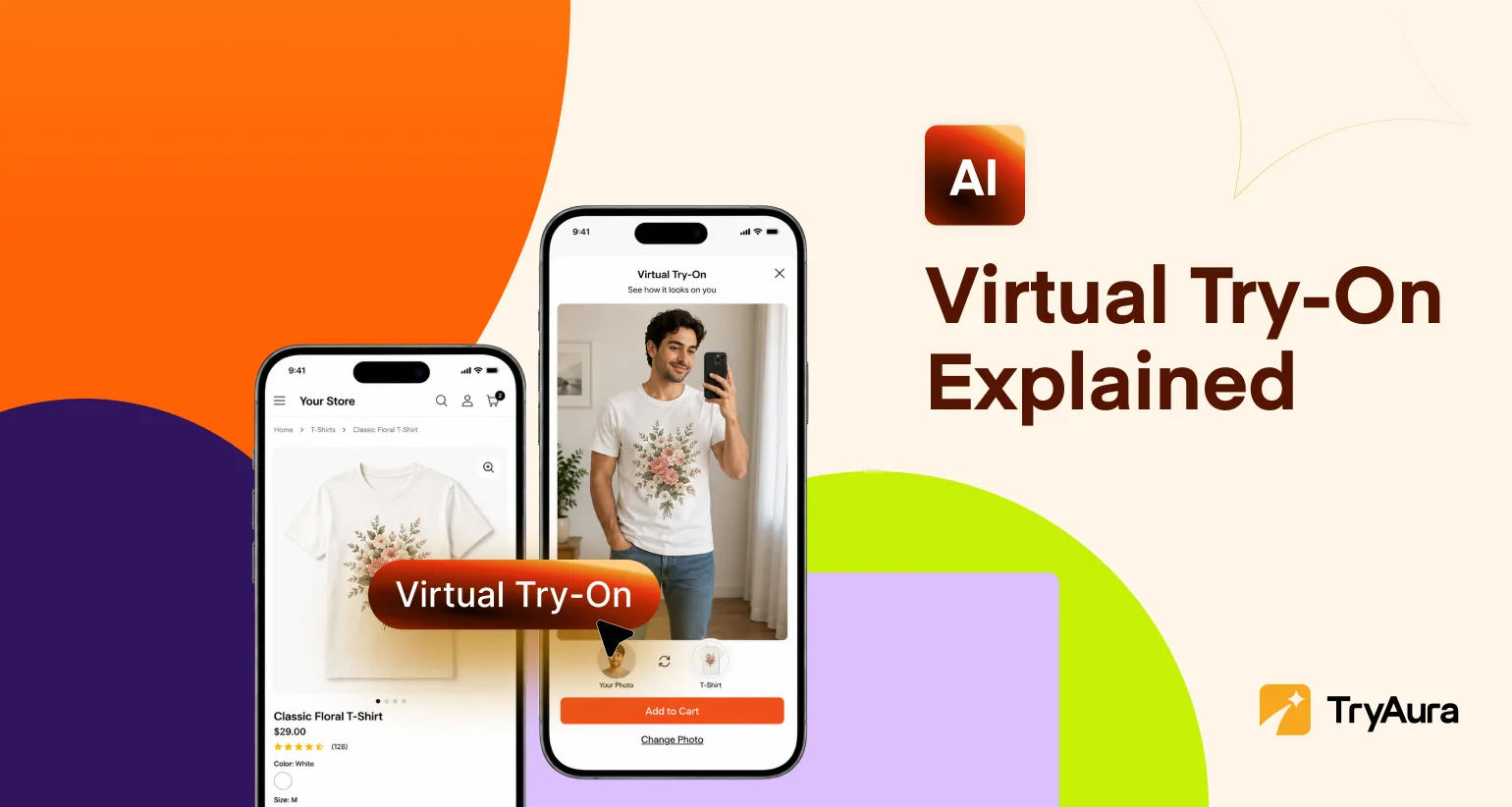
Yes. Virtual try-on remains part of TryAura. Store owners can enable it on relevant WooCommerce products so shoppers can upload a photo or use a camera to preview how an item may look.
Do I need professional product photography
No. TryAura can work with existing WooCommerce product images. Clear, well-lit source photos with a simple background usually give the model better information and can produce more reliable results.
Does TryAura charge credits for every generation
No. TryAura uses a bring-your-own-key model. You connect your own Google Gemini API key and pay Google directly for API usage. TryAura does not sell expiring image credit packs.
A Better Product Visual Workflow Starts Here
TryAura V2 is built around a simple belief: store owners should not have to choose between creative control and a simple workflow.
TryAura lite gives more merchants the tools to create accurate, accessible, high-resolution product images. Pro adds the ability to save visual direction, correct existing images, create professional apparel outputs, and direct product videos with greater precision.
Together, these changes make TryAura a more complete AI product visual studio for WooCommerce.
Start with one product photo. Create the visuals your store needs. Fix what is not right. Reuse what works. Bring the product to life when motion can tell the story better.
Category:
Tags: